In order to design this program, I need to explain some financial concepts. The term loan amortization means the computation of the amount of equal periodic payments necessary to provide lender with a specific interest return and repay the loan principal over a specified period. The loan amortization process involves finding the future payments whose present value at the load interest rate equal the amount of initial principal borrowed. Lenders use a loan amortization schedule to determine these payment amounts and the allocation of each payment to interest and principal.
The formula to calculate periodic payment is payment=Initial Principal/PVIFAn, where PVIFAn is known as present value interest factor for an annuity . The formula to compute PVIFAn is 1/i - 1/i(1+i)n where n is the number of payments. Normally you can check up a financial table for the value of PVIFAn and then calculate the payments manually. You can also use a financial calculator to compute the values. However, if you already know how to program in VB, why not create your very own financial calculator.
To calculate the payments for interest, you can multiply the initial principal with the interest rate, then use periodic payment to minus payment for interest. To calculate the balance at the end of a period, use the formula
End-of_year principal=Beginning-of-year principal-periodic payment
The Interface
P = Txt_Principal.Text
Num = Txt_Num_payment.Text
r = Txt_Interest.Text
I = r / 100
PVIFA = 1 / I - 1 / (I * (1 + I) ^ Num)
pmt = P / PVIFA
Lbl_Amtpayment.Caption = Round(pmt, 2)
End Sub
Private Sub Cmd_Create_Click()
List_Amortization.AddItem "n" & vbTab & "Periodic" & vbTab & vbTab & "Payment" & vbTab & vbTab & "Payment" & vbTab & vbTab & "Balance"
List_Amortization.AddItem "" & vbTab & "Payment" & vbTab & vbTab & "Interest" & vbTab & vbTab & "Principal"
List_Amortization.AddItem "_______________________________________________________________________"
Do
n = n + 1
PI = P * I
PP = pmt - PI
P = P - PP
List_Amortization.AddItem n & vbTab & Round(pmt, 2) & vbTab & vbTab & Round(PI, 2) & vbTab & vbTab & Round(PP, 2) & vbTab & vbTab & Round(P, 2)
If n = Num Then
Exit Do
End If
Loop
End Sub
Private Sub Cmd_Reset_Click()
Txt_Principal.Text = ""
Txt_Interest.Text = ""
Txt_Num_payment.Text = ""
Lbl_Amtpayment.Caption = ""
List_Amortization.Clear
n = 0
End Sub
Private Sub Command4_Click()
End
End Sub

Depreciation is an important element in the management of a company's assets. With proper and accurate calculation of depreciation, a company can benefit from the tax advantage. Depreciation is normally computed based on the initial purchase price or initial cosat, number of years of where depreciation is calculated, salvage value at the end of the depreciation period, and the asset's life span.
The Format of a depreciation function is
DDB(Cost,Salvage,Life, Period)
Cost=Initial cost
Salvage=Salvage value
Life=Asset's life span
Period=Depreciation period
Dim Int_Cost, Sal_Value, Asset_Life, Deperiod, Depre_Amt As Double
Int_Cost = Val(Txt_Cost.Text)
Sal_Value = Val(Txt_Salvage.Text)
Asset_Life = Val(Txt_Life.Text)
Deperiod = Val(Txt_Period.Text)
Depre_Amt = DDB(Int_Cost, Sal_Value, Asset_Life, Deperiod)
Lbl_Dpre.Caption = Format(Depre_Amt, "$###,###,000.00")
End Sub

This program involves the use of the formula
where PV represents the present value, FV represents the future value , i is the interest rate and n is the number of periods (Normally months or years). I created a function which have two parameters, namely i and n. Then I wrote the procedure to call this function.
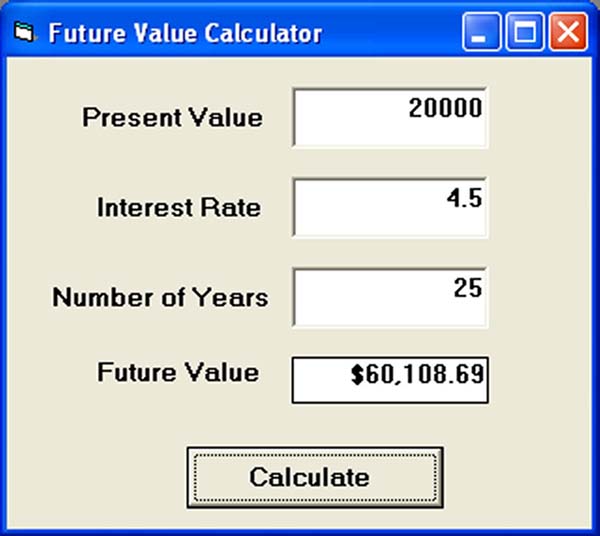
'Formula to calculate Future Value(FV)
'PV denotes Present Value
FV = PV * (1 + i / 100) ^ n
End Function
Private Sub compute_Click()
'This procedure will calculate Future Value
Dim FutureVal As Currency
Dim PresentVal As Currency
Dim interest As Variant
Dim period As Variant
PresentVal = PV.Text
interest = rate.Text
period = years.Text
FutureVal = FV(PresentVal, interest, period)
Label5.Caption = Format(FutureVal, "currency")
End Sub
Private Sub period_Change()
End Sub
The Format of a PV function is
PV(Rate,Nper, Pmt,FV,Due)
Rate=Interest rate
Nper=The length of period (Usually number of years)
Pmt=Periodic payment
FV=Future Value
Due= 1 if payment due at beginning of a period and Due=0 if payment due at the end of a period.

In my example, I am considering one single initial investment in order to earn a certain amount of money in the future, so Pmt is set to 0, and payment due is at the beginning of the period, so it is set at 0, the rest of the values are obtained from the users.
Dim F_Money, Int_Rate, Investment As Double
Dim numYear As Single
F_Money = Val(Txt_FV.Text)
Int_Rate = (Val(Txt_Rate.Text) / 100)
numYear = Val(Txt_Year.Text)
Investment = PV(Int_Rate, numYear, 0, F_Money, 1)
Lbl_PV.Caption = Format(-Investment, "$##,###,##0.00")
End Sub
The Format of loan payback period is
Nper(Rate,Pmt,Pv,Fv,Due)
Rate=Interest Rate
Pmt=Amount of Periodic Payment
PV=Loan taken
FV=Future Value (set to 0 if load is settled)
Due=set to 1 if payment at the begining of the period
set to 0 if payment at the end of the period

Dim payment, Loan, Int_Rate As Double
Dim Num_year As Single
payment = Val(Txt_Payment.Text)
Int_Rate = (Val(Txt_Rate.Text) / 100) / 12
Loan = Val(Txt_PV.Text)
Num_year = NPer(Int_Rate, payment, -Loan, 0, 0) / 12
Lbl_Period.Caption = Str(Int(Num_year))
End Sub
A lot of people are obese now and it could affect their health seriously . Obesity has proven by the medical experts to be a one of the main factors that brings many adverse medical problems, including the the heart disease. If your BMI is more than 30, you are considered obese. You can refer to the following range of BMI values for your weight status.
Underweight = <18.5 weight =" 18.5-24.9" overweight =" 25-29.9" obesity =" BMI" class="codetitle">Code:
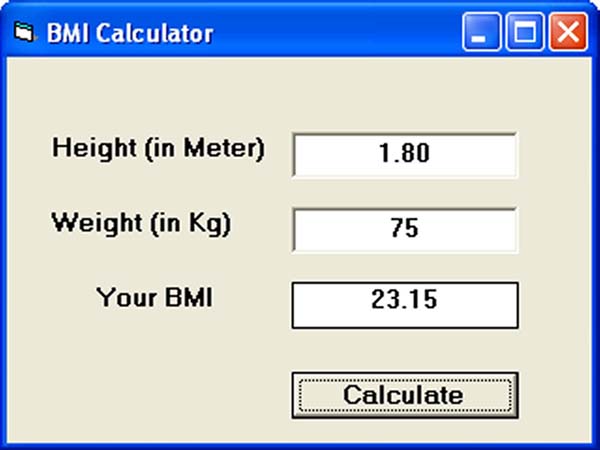
Label4.Caption = BMI(Text1.Text, Text2.Text)
End Sub
Private Function BMI(height, weight)
BMIValue = (weight) / (height ^ 2)
BMI = Format(BMIValue, "0.00")
End Function
I have programmed this calculate that resembles a typical calculator that consists of the number buttons, the operator buttons and some additional buttons such as the memory button and the clear button. I have tested it and it performs just as good as the Microsoft Windows's calculator.To design the interface, you need to insert 25 command buttons, and one label that functions as the display panel. The number buttons from 1 to 9 are grouped together as a control array and named as ButtonNum while 0 is a standalone command and named as Bzero. The four basic operators are also grouped together as a control array and named as Operator. Other buttons are named appropriately according to their functions. The label is named as panel
One of the most important procedures in the program is to control the display on the panel. The procedure is
If Num_of_digit > 0 Then
If Num_of_digit < 30 Then
panel. Caption = panel.Caption + Right$(Str(Index), 1)
Num_of_digit = Num_of_digit + 1
End If
Else
panel.Caption = Right$(Str(Index), 1)
Num_of_digit = 1
End If
CheckValue
End Sub
The Num_of_digit is a variable that is used to check the number of digits that appear on the display panel. The procedure will ensure that if the number of digits is more than one, the preceding digit will be pushed to the left and the succeeding digit will remain on the right. However, if the number of digits is zero, the digit clicked will just appear on the rightmost position of the panel.